
This is a work in progress (as most of my projects seem to be) and in the early stages. It started as a challenge to provide assistance a person who cannot pick up a cup. The idea is that a robotic arm will pick up the cup and hold it in front of the user if they cannot do this themselves. By pressing a single push button, the cup will be guided into position using computer vision. It’s not a completely new idea, as a research team based in Germany produced something similar in 2022 (Klebbe et al, 2022) but using a much more sophisticated (and expensive) robot arm (Franka Emika 7 axis panda manipulator – a similar design today costs around £30,000) and vision system. The general outline of my budget version is given below.
The robot ‘Helping Hand’ under development is based upon an existing arm mechanism designed by Tom Knox and is modified to hold a lightweight cup, use a depth camera and computer vision for guidance. This is only a prototype ‘proof-of-concept’ to test how well a low-cost budget arm could function, and also discover more about programming digital devices that are personalised (this is a key feature in a lot of work we do at Rix).
The arm does not reach the mouth
The most robust approach is for the arm to bring drinking straw to a standoff position a few centimetres from the lips, then stop. The user may then have to lean in for the last bit. This keeps the robot arm from ever touching the face, tolerates head movement, and gives the user control of the final approach. A stainless steel straw fixed into the cup might help here. A temperature sensor will also be added to the cup to monitor the temperature. When safe to drink, the device will play a voice informing the user that they can now drink.
Face landmark model
The initial version will not recognise the user, but just use computer vision (via MediaPipe Face Landmarker) to determine just the location of the facial features, particularly the lips. Here’s a demo of how it works. You can see with the images the simple facial features that are recognised (eyes, nose, mouth) or if you have a webcam attached, you can try the realtime version.
Find the points on a face
Facial landmarks are points that mark where features such as the eyes, nose and mouth appear in an image.
Five landmarks
There is one point at each eye, one at the tip of the nose and one at each corner of the mouth. Select Mouth to see how two points give us a centre.
Illustration with preset points. No camera or live detection.
Try live facial landmarking
Start your webcam, then turn or tilt your head gently. Watch the points follow your eyes, nose and mouth. The gold cross marks the midpoint between the mouth corners.
Your browser downloads the landmark model and processes the video on your device. The demo sends no images and does not identify you.
Once the landmarking system is refined, then facial recognition will be added. This is necessary so that the software will guide the cup to the intended user, and not someone else sitting nearby.
Most of the parts have been printed already, and now awaiting the hardware so that it can be assembled. The parts are printed in PLA using a Prusa MK4S.
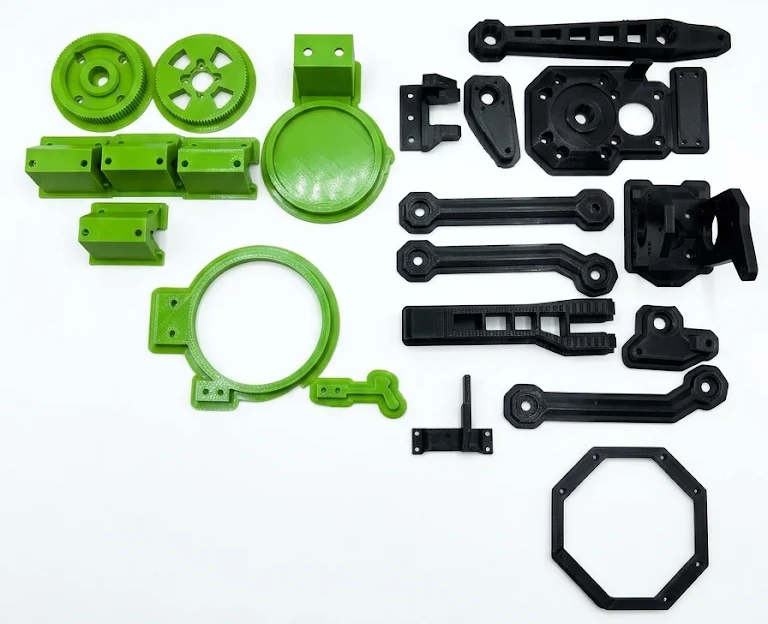
One of the main differences to the original design is the addition of a cup holder (some of the green parts above) instead of a gripper hand. A rough idea of how this will work is given below.
The Cup Holder
The cup holder replaces the original gripper hand, but as the stepper motors (and the design of the arm) are not intended to carry a great deal of weight, a lightweight (empty) cup will be used to test the arm and not a full sized cup. This is the initial design for the cup holder:
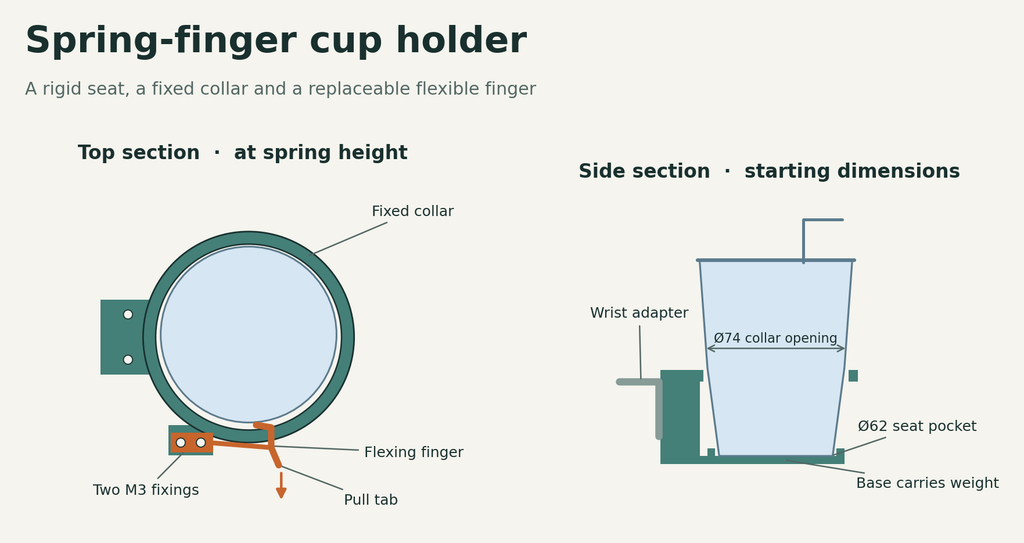
The base attaches directly to the end of the arm instead of the gripper, and is prevented form wobbling by using a simple fixed collar and flexible finger that holds the cup still.
Images of the working model will be uploaded as soon as it is ready.